今天在网上找到一款回旋滚动效果,拿出来和大家一起分享。先上效果图:
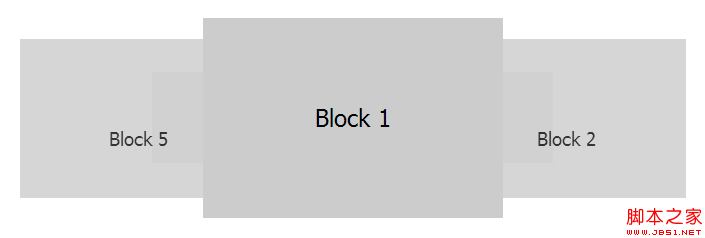
html 代码:
<!DOCtypeHTML>
<html lang="en-US">
<head>
<metacharset="UTF-8">
<title>JQuery-roundabout</title>
<style type="text/CSS">
*{padding:0;margin:0;}
body{font:24px tahoma;}
ul{list-style:none;margin:100px auto 0;width:500px;height:200px;}
li{line-height:200px;height:200px;width:300px;background:#ccc;text-align:center;cursor:pointer;}
li.roundabout-in-focus{Cursor:default;}
</style>
</head>
<body>
<ul class="roundabout">
<li>block 1</li>
<li>Block 2</li>
<li>Block 3</li>
<li>Block 4</li>
<li>Block 5</li>
</ul>
</body>
</html>
<script type="text/javascript" src="http://Ajax.googleAPIs.com/ajax/libs/jQuery/1.4.2/jquery.min.JS"></script>
<script type="text/JavaScript" src="js/jquery.roundabout.min.js"></script>
<script type="text/Javascript">
$(function(){
$('.roundabout').roundabout();
});
</script>
关于 roundabout.js 的代码可以去官网上下载,这里就不写了,太长了。点击官网地址。
html 代码:
复制代码 代码如下:
<!DOCtypeHTML>
<html lang="en-US">
<head>
<metacharset="UTF-8">
<title>JQuery-roundabout</title>
<style type="text/CSS">
*{padding:0;margin:0;}
body{font:24px tahoma;}
ul{list-style:none;margin:100px auto 0;width:500px;height:200px;}
li{line-height:200px;height:200px;width:300px;background:#ccc;text-align:center;cursor:pointer;}
li.roundabout-in-focus{Cursor:default;}
</style>
</head>
<body>
<ul class="roundabout">
<li>block 1</li>
<li>Block 2</li>
<li>Block 3</li>
<li>Block 4</li>
<li>Block 5</li>
</ul>
</body>
</html>
<script type="text/javascript" src="http://Ajax.googleAPIs.com/ajax/libs/jQuery/1.4.2/jquery.min.JS"></script>
<script type="text/JavaScript" src="js/jquery.roundabout.min.js"></script>
<script type="text/Javascript">
$(function(){
$('.roundabout').roundabout();
});
</script>
关于 roundabout.js 的代码可以去官网上下载,这里就不写了,太长了。点击官网地址。







网友评论文明上网理性发言已有0人参与
发表评论: