先给大家介绍下vue发送websocket请求和HTTP post请求
直接上代码:
pdf.VUE
<script> import SockJS from 'sockjs-client'; import Stomp from 'stompjs'; import qs from "qs" Export default { name: "pdf", data() { return { newsData: [], tagGUId_mx: "", tagGuid_4AA_Ia: "", tagGuid_4AA_P: "", tagGuid_4AA_Q: "", 49 tagGuid_1AA_6_Ib: "", tagGuid_1AA_6_Ic: "", tagGuid_pdfwd: "", tagGuid_pdfsd: "", stomPClient: '', timer: '', visibilityHeZha: "hidden", visibilityFenZha: "hidden", hezhaData:[] } }, methods: { initWEBSocket() { this.connection(); let that = this; // 断开重连机制,尝试发送消息,捕获异常发生时重连 this.timer = SetInterval(() => { try { that.stompclIEnt.send("test"); } catch(err) { console.log("断线了: " + err); that.connection(); } }, 5000); }, connection() { // 建立连接对象 let socket = new SockJS('http://XXX.XX.XX.XXX:8081/energy-system-websocket'); // 获取STOMP子协议的客户端对象 this.stompClient = Stomp.over(socket); // 定义客户端的认证信息,按需求配置 let headers = { access_token: "92c31bd5-ae43-4f25-9aad-c4eb1a92d61d" // Authorization: '' } // 向服务器发起websocket连接 this.stompClient.connect(headers, () => { this.stompClient.subscribe('/User/topic/data', (msg) => { // 订阅服务端提供的某个topic console.log('广播成功') // console.log(msg); // msg.body存放的是服务端发送给我们的信息 console.log(msg.body); this.newsData = JSON.parse(msg.body); }, headers), this.stompClient.subscribe('/user/topic/alarm', (msg) => { // 订阅服务端提供的某个topic console.log('广播告警成功') //console.log(msg); // msg.body存放的是服务端发送给我们的信息 console.log(msg.body); this.newsData = json.parse(msg.body); }, headers); this.stompClient.subscribe('/user/topic/cmd_ack', (msg) => { // 订阅服务端提供的某个topic console.log('下控指令应答成功') //console.log(msg); // msg.body存放的是服务端发送给我们的信息 console.log(msg.body); this.newsData = JSON.parse(msg.body); }, headers); this.stompClient.subscribe('/user/topic/response', (msg) => { //指令的应答(仅表示服务端接收成功或者失败) console.log('SEND指令的应答成功') //console.log(msg); // msg.body存放的是服务端发送给我们的信息 console.log(msg.body); this.newsData = JSON.parse(msg.body); this.newsData = this.newsData.data; console.log(this.newsData); for(var i = 0; i < this.newsData.length; i++) { //母线uab if(this.newsData[i].tagGuid == "a3a95bf3-fef8-454e-9175-19a466e40c3D") { this.tagGuid_mx = this.newsData[i].value != '' ? this.newsData[i].value.toFixed(2) : "" } //电容柜4AA_Ia if(this.newsData[i].tagGuid == "4cf6e256-6c3a-4853-a087-dfd263916dab") { this.tagGuid_4AA_Ia = this.newsData[i].value } //电容柜4AA_P if(this.newsData[i].tagGuid == "52e8265a-0a20-4e3b-a670-14a8df373bf7") { this.tagGuid_4AA_P = this.newsData[i].value } //电容柜4AA_Q if(this.newsData[i].tagGuid == "ef369a17-0bbd-4295-8ac7-816c23fcb065") { this.tagGuid_4AA_Q = this.newsData[i].value != '' ? this.newsData[i].value.tofixed(2) : 0 }276 //配电房温度 if(this.newsData[i].tagGuid == "ead49446-07f9-43b7-a4ce-cd974d53728e") { this.tagGuid_pdfwd = this.newsData[i].value } //配电房湿度 if(this.newsData[i].tagGuid == "baaf1733-124e-46fd-9d58-c069b747317a") { this.tagGuid_pdfsd = this.newsData[i].value } } }, headers); this.stompClient.send("/APP/monitor/suBTagGuid", // # 订阅需要监控的测点ID headers, JSON.stringify({ "stationCode": "00013", "tagGuids": [ "a3a95bf3-fef8-454e-9175-19a466e40c3d", // "4cf6e256-6c3a-4853-a087-dfd263916dab", // "52e8265a-0a20-4e3b-a670-14a8df373bf7", // "ef369a17-0bbd-4295-8ac7-816c23fcb065", //334 "baaf1733-124e-46fd-9d58-c069b747317a" ] }) ) //用户加入接口 }, (err) => { // 连接发生错误时的处理函数 console.log('失败') console.log(err); }); }, //连接 后台 disconnect() { if(this.stompClient) { this.stompClient.disconnect(); } }, // 断开连接 changecolor(evt) { this.rect.setAttributeNS(null, "fill", "blue") }, shl3aa4() { this.visibilityHeZha = this.visibilityHeZha == "visibility" ? "hidden" : "visibility"; this.visibilityFenZha = this.visibilityFenZha == "visibility" ? "hidden" : "visibility"; }, shl3aa42() { setTimeout(() => { this.visibilityHeZha = "hidden"; this.visibilityFenZha = "hidden"; }, 1200) }, hezha() { //3#楼3AA-4_合闸 this.$Axios.post("/energy-system/auth/monitor/ykcmd", { checkUser: "admin", checkPass: "123456", stationcode:"00013", tagGuid: "89d1d312-17be-4d20-8471-baa08ba734e0", value: 1 }) .then(res => { this.hezhaData=JSON.parse(res.config.data) if(this.hezhaData.tagGuid=="89d1d312-17be-4d20-8471-baa08ba734e0" && this.hezhaData.value==1){ alert("合闸成功!"); }else{ alert("合闸失败!请联系管理员"); }379 }) .catch(error => { console.log(error) }) }, fenzha() { alert("分闸"); //3#楼3AA-4_分闸 } }, mounted() { this.initWebSocket(); }, beforeDestroy: function() { // 页面离开时断开连接,清除定时器 this.disconnect(); clearinterval(this.timer); }, created() { } } </script>
在mAIn.js设置全局http地址:
axios.defaults.baseurl = 'http://XXX.XXX.XX.XXX:9001';
AxiOS.defaults.headers.post['Content-type'] = 'application/x-www-FORM-urlencoded';
在main.js中设置header中token值:
// 添加请求拦截器
AxIOS.interceptors.request.use(function(config) {
  config.headers.access_token = "add7c097-f12b-40fe-8e48-6fe1f2120fa5";
  //  config.headers.Authorization = localStorage.token; //将token设置成请求头
  console.log("请求============" + config);
  // 在发送请求之前做些什么
  return config;
}, function(error) {
  // 对请求错误做些什么
  return Promise.reject(error);
});
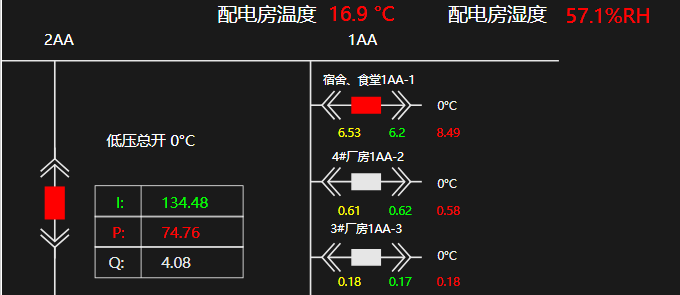
数据刷起来!
ps:下面给大家介绍下Vue websocket 请求
首先写一个公共方法
socket.js
function getSocket(url, params, callback) {
  let socket;
  if (typeof (WebSocket) === 'undefined') {
    console.log('您的浏览器不支持WebSocket');
  } else {
    console.log('您的浏览器支持WebSocket');
    // 初始化 WebSocket 对象,指定要连接的服务器地址与端口建立连接
    socket = new WebSocket(url);
    // 打开事件
    socket.onopen = function() {
      console.log('Socket 已打开');
      socket.send(params);
    };
    // 获得消息事件
    socket.onmessage = function(msg) {
      // 发现消息进入, 开始处理前端触发逻辑
      callback(msg, socket);
    };
    // 关闭事件
    socket.onclose = function() {
      console.log('Socket 已关闭');
    };
    // 发生了错误事件
    socket.onerror = function() {
      console.log('Socket 发生了错误,请刷新页面');
      // 此时可以尝试刷新页面
    };
  }
}
export {
  getSocket
};
使用
test.vue
<script>
import {getSocket} from '@/utils/socket.js';
export default {
  data() {
    return {
      wsData: {}, // 保存 websocket 数据对象
      form: { // 表单
        name: '',
        age: ''
      }
    }
  },
  beforeDestroy() {
    this.wsData.close(); // 关闭 websocket
  },
  created() {
    this.getSocketData();
  },
  methods: {
    // 获取数据
    getSocketData() {
      let params = this.Form;
      getSocket(
        `ws://path`,
        JSON.stringify(params),
        (data, ws) => {
          console.log(data, ws);
          // 保存数据对象, 以便发送消息
          this.wsData = ws;
        }
      );
    },
    // 发送数据
    sendSocketData() {
      let params = this.form;
      params.name = 'xx';
      params.age= '18';
      this.wsData.send(JSON.Stringify(params));
    }
  }
}
</script> 


网友评论文明上网理性发言 已有0人参与
发表评论: